


Make investment choices with the whole picture in mind and set yourself up for long-term success.
Whether retirement is years away or you’re already in it, get clarity on the possibilities and choices.
With an adaptable, flexible, and highly personal plan, you’ll be creating a better future with every choice.
Meet the Griffin Black team
Proudly serving the greater Bay Area
Cross-border wealth management

Not all advisors are alike
Workshops and seminars
Performance and events
Altruist, Tax Planning, Security
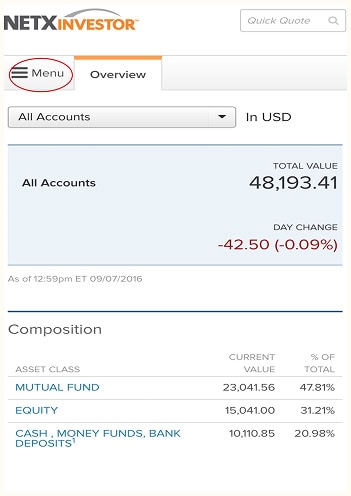
If your account is held with Pershing LLC, then the NetXInvestor™️ app provides access to your account, tax statements, and trade confirmations. See account information for balances, holdings, activity, and order status.
When funding an account by check, it’s important to follow the instructions outlined below. Doing so helps ensure timely processing and avoids unnecessary delays. If the instructions aren’t followed, the check may be returned to the sender or to the address of record. You should always keep a copy of submitted checks for 7 business days until funds are deposited.
Please make sure each check meets the following criteria:
Certified Mail Recommended: To ensure secure delivery and tracking, we recommend sending checks via certified mail.
Mail check deposits to:
Pershing, LLC
1 Pershing Plaza
Jersey City, NJ 07399
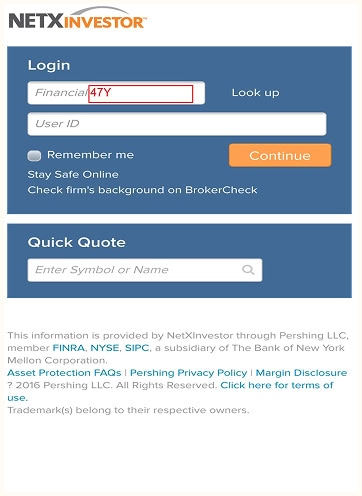
Enter 47Y in the Financial Organization field.
Enter your user ID. Click Continue.
Select Menu at the top of the screen.
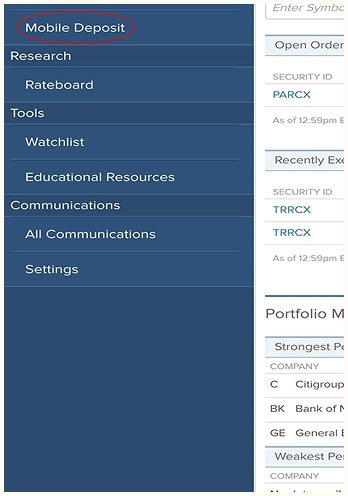
Select Mobile Deposit from the menu.
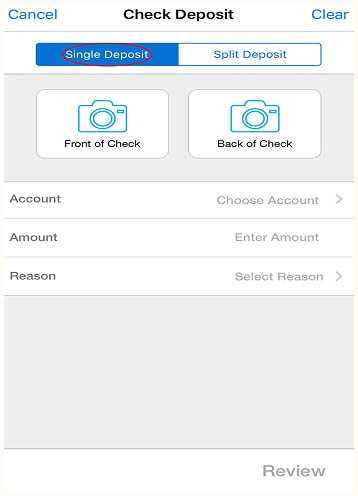
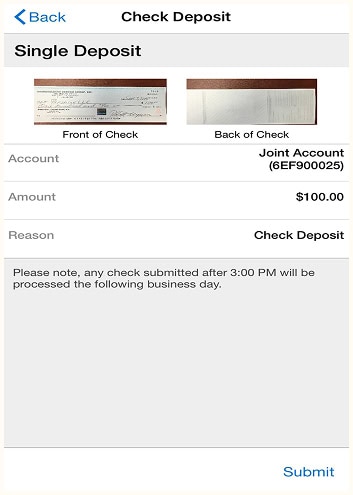
After choosing the type of account receiving the deposit, take a picture of the front and back of the check using the app.
Note: Single Deposit should be selected at the top of the screen.
Next, complete the rest of the information for the deposit: which account, the amount, and the reason for the deposit. Then click Submit.
Note: For IRA checks, please choose current year or previous year contribution, depending on the year to which the deposit is to be allocated.
Please note the deadline for same-day processing.
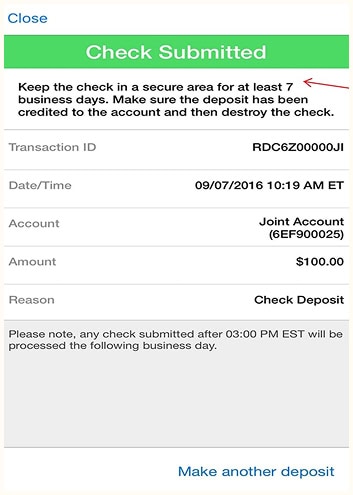
You’ll see a Check Submitted confirmation page once the deposit is complete.
Note: Please follow the instructions at the top of the confirmation page and keep the check secure for 7 days before destroying it.